Photo by: Seej Nguyen
I have a 95-year-old Grandma, who is my personal audiobook marathoner. She devours them, but... the shelves of ready-made audio productions started getting thin. Since boredom is a state a senior should definitely avoid, I thought: what if I made a gift that money can't buy?
I decided to use a Text-to-Speech (TTS) model with voice cloning capability. The model takes my voice as a "DNA sample," and then reads texts, generating audiobooks... in my own voice! Here's a short story of how I transformed EPUB files into a personal narrator for Grandma.
Backend: Python and a Humble 2 GB of RAM
I started with the basics: Python (of course!). I wrote the EPUB processing script from scratch for this project – it only handled cutting and initial formatting. Zero LLM, pure algorithmics: open, cut, feed in a loop. The magic truly began in the TTS model. The Project Star: Coqui TTS XTTS v2 from Hugging Face. Multilingual (handles Polish brilliantly). Voice cloning capable (a sample is enough). Requires a modest ~2 GB of RAM. But remember to close unnecessary apps anyway!
The Intonation Battle: 200 vs. 2000 Characters
At first, I approached the problem zero-one: cut the text into 200-character chunks and feed them to the model. The result? Terrifying, unnatural pauses. It sounded like the narrator was taking a deep breath every two sentences and starting over. Terrible.
And this is where I realized it's all about the natural flow of the text.
After some research (some documentation on Superwhisper, which optimizes long samples, also helped), I extended the buffer to 2000 characters. But that wasn't all. You have to cut smartly. The text is first divided by paragraphs, then by sentences, and finally by words. This way, the cut always falls in a natural spot, not in the middle of a phrase. Suddenly, the intonation became as smooth as a JavaScript Promise :) (or almost).
Crossfade and Soft Warning: The Wisdom of XTTS v2
Despite the improvement, the issue of audible silence between the generated paragraphs was still annoying. Solution number one? Crossfade (audio blending). Instead of an abrupt cutoff, you smoothly connect the end of one fragment with the start of the next, overlapping them. Zero noticeable gaps, a seamless transition.
Crucially, XTTS v2 already has built-in streaming and mechanisms for smart splitting of long samples!
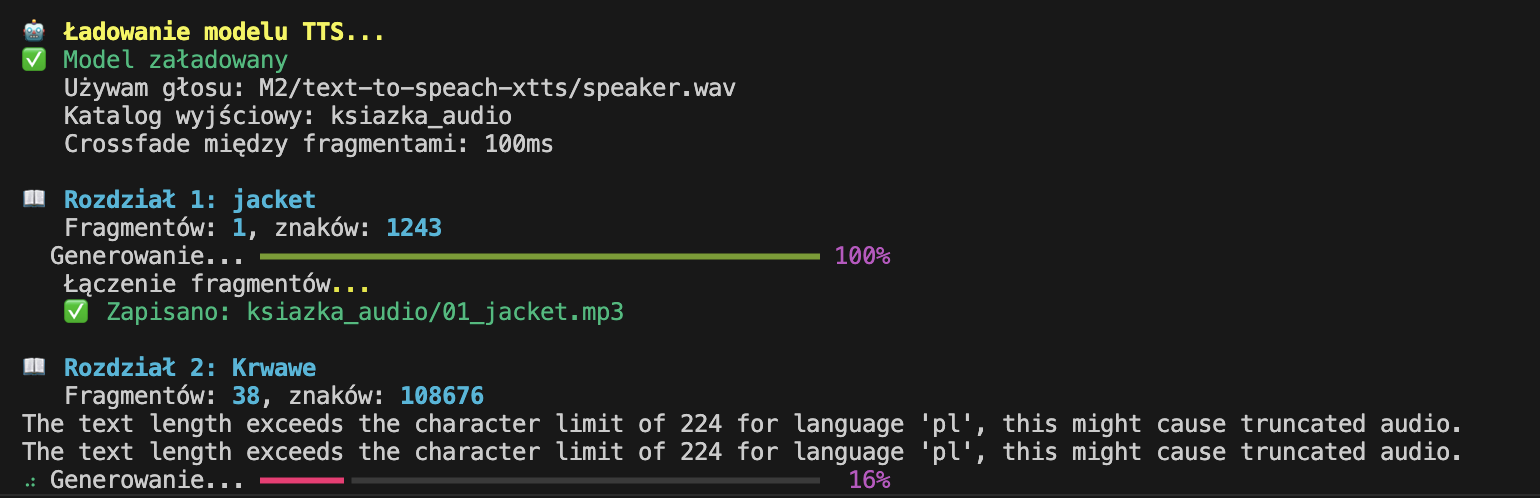
As you can see in the screenshot, a message appeared every now and then that I was exceeding the recommended length of 200 characters. This is a soft warning, not a hard error! The model automatically split the text itself, and then cleverly stitched it back together. Thanks to this, despite the warning, the text was very smooth, and there wasn't that annoying cutoff every 200 characters. If you try to replicate this – know that this warning is only a suggestion, not a death sentence for your audiobook!
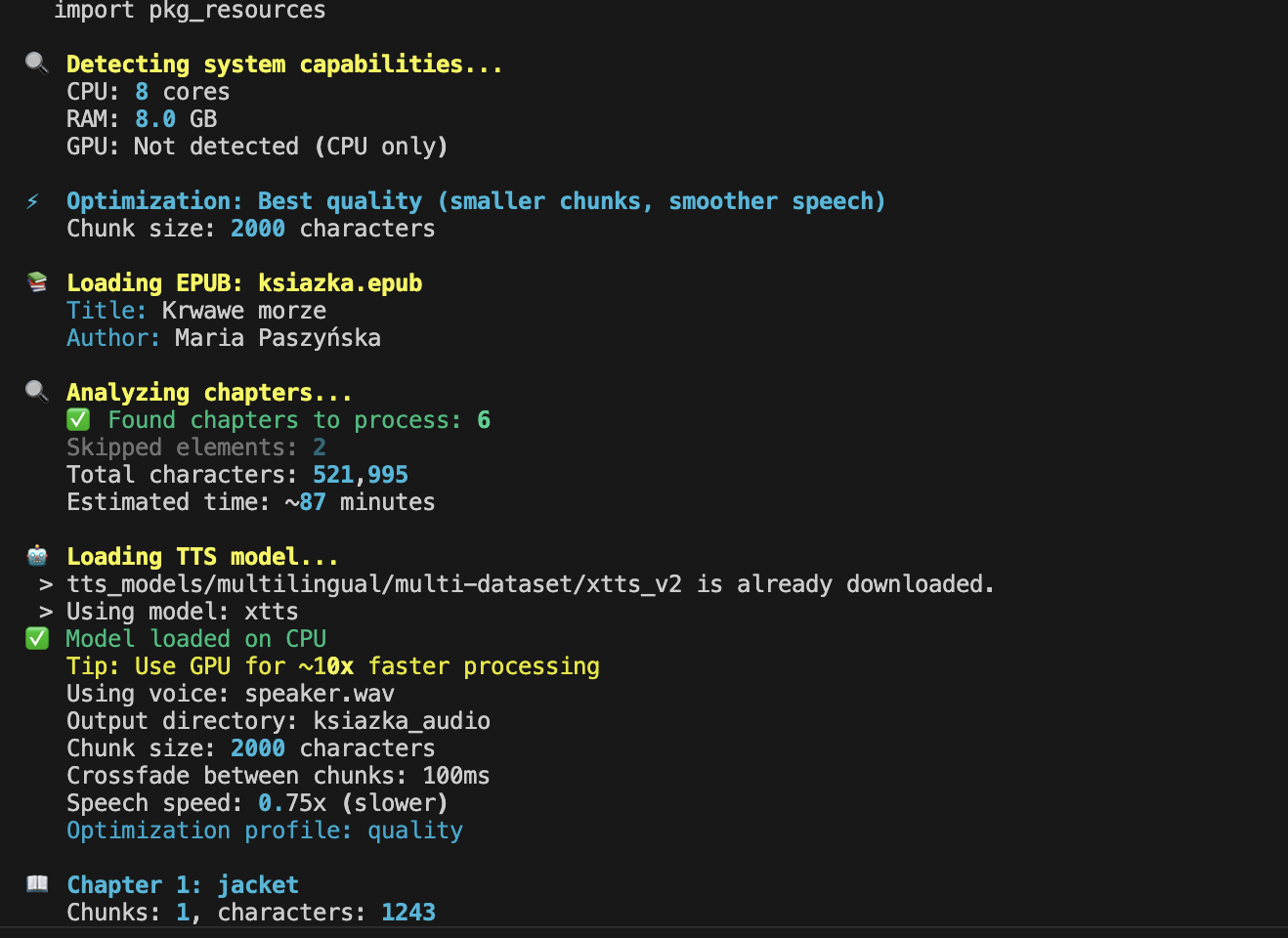
During encoding, I tried to estimate how long it would take to generate the book, and it showed me about 87 minutes. It ultimately turned out to be around twelve hours, so there's definitely room for improvement here (both in estimation and optimization).
Optimization
Initially, the model also generated readings of the cover, reviews, introductions, and other digital extras. All that "look & feel" content in a book is absolutely unnecessary. I threw out this "paper waste," leaving only the author, title, and possible chapter headings.
I also added an attempt to optimize how the model works – when the script detected it was running on a powerful computer with a GPU, it automatically optimized the model settings. Below is a screenshot from one of the attempts:
Final Feature: Word Speed Adjustment
At the very end, a small detail that turned out to be crucial from Grandma's listening perspective: speech speed. The default generation tempo was too dynamic for her. So, I added a simple flag to the script that deliberately slowed down the generated text. The book took longer, but its comprehensibility skyrocketed. And that's what it was all about.
What's Next
This entire stack is, of course, open source! I encourage you: if you know basics of Python, feel free to download, run, and test it. As is the case in the open-source world – every contribution is welcome!
It's possible that a community will emerge around this, turning the project into a ready-made app. But that's a future me problem, as they say.
I will definitely keep developing this project because I see there's still room for improvement in the text processing itself, for example, dates are read in an unnatural way. Plus, Grandma is starting to test the audiobooks "live," so there will probably be more than one bug to fix.
You can listen to a sample of the book I generated below. It's an excerpt from "Krwawe Morze" (Bloody Sea) by Maria Paszyńska, published by Książnica, 408 pages (don't judge Grandma's choice :)).
Takeaways from the Experiment
Even on my years-old MacBook Air, it's manageable. Open-source models are powerful and free to use. All it takes is a bit of Python, a local coding assistant, and voilà! A miracle achieved.
Sure, I could have just gone to ElevenLabs and had a professionally sounding, polished audiobook. They would've done it faster and probably flawlessly. But that's not the point! A custom model, generating books for my 95-year-old Grandma, run on my own hardware, after grappling with crossfade and script optimization - that's awesome!